
Try it now for free
Powerful. Flexible. Fun.
The most powerful and flexible voice control system for Windows. Nothing else comes close.
Try it now for free

Try VoxWav Free and turn your Android into a wireless microphone.


Join our global community
VoxCommando SP supports 20+ languages and accents
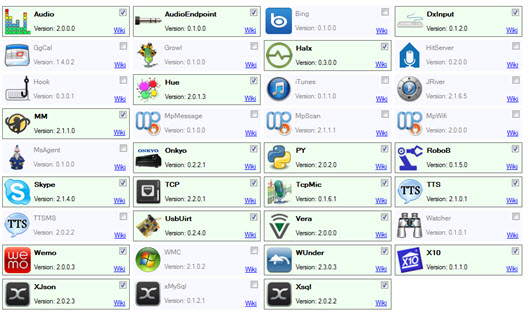
Many plugins . . .
= more possibilities

VoxCommando puts you in the captain's chair ...
VoxCommando is a speech recognition and command utility that lets you take control of your multimedia HTPC (Home Theatre PC). You can add voice control to your home automation, or you can use it as an assistive tool to speed up everyday tasks, to reduce your reliance on the keyboard and mouse, or simply because it is fun to use!
VoxCommando is different from other speech recognition applications in that it is extremely customisable, and is designed to work with a wide variety of other multimedia programs such as Kodi and MediaMonkey. VoxCommando is able to achieve accurate speech recognition because it knows what media is in your library, so it knows what commands to listen for.
Why use VoxCommando
User reviews
Thanks for a wonderful program, James. I’m very happy with my purchase. Vox + EventGhost + XBMC + Kinect = HTPC GLORY. I am LOVING it.
VoxCommando supplement that was needed for use in my media center, easy to use and extremely powerful. I am Brazilian, and even in my native language, it works perfectly, I recommend its use by people of all nationalities.
I’ve purchased the full version as your support/program design seems brilliant and great value. Thank you for producing such an impressive product with a well thought out trial version that doesn’t force people into buying before they know if it’ll do what they require.
This is so addictive, I stayed up till 5 in the morning last night, just by delving myself into this and losing track of time. That hasn’t happend to me since the old days when I was scripting eggdrops on linux boxes, aaah good ol’ days THANK YOU FOR THIS !
My wife has now been VoxCommando widowed saw a post on her face book “my husband is sitting at the computer saying ‘Play Bob chuffing Dylan'”… hee hee hee very funny but true .
I love VoxCommando and think that your work is pure genius… it is incredibly simple and fun to play whatever song I want while driving in my car with prefix mode enabled. Just awesome.
… what a great software VC is. tested it twice and had to buy it right away. Love it, love it, love it!
…I just started using this magnificent program, and have discovered some pretty awesome possibilities already! Thank you for this extremely well built program.
P.S. Absolutely loving Vox at the moment, been playing with it a week and feel like I’ve only scratched the surface of what is possible.
VC has completely changed my routine when I get home from work, I just walk in the living room and say “rock me, computer”, it opens a custom spotify radio within xbmc and starts playing.
First of all, this software is literally mind blowingly brilliant, when I tell my friends what I have achieved so far they don’t believe me.
I have purchased both the Android App and the full version of Voxcommando. I can’t say enough about this software! Absolutely fantastic. Keep up the amazing work!
Greetings all — Another new guy to VC, found the program on XBMC forums and absolutely loving it. My extent of knowledge with programming is as much as installing XBMC, although I’ve now spent three days on learning Python and I’m hooked!
Hi, Loving having just found this, hours of tinkering commence
Just found out about VC about 1 week ago and was trialing the software. I got so caught up in it’s awesomeness man!
I downloaded VC few days go … since then I can’t go to sleep Grin … I build in 3 days what i was planing to build in 3 years… the software is just magic …
many thanks to jitterjames for such an amazing piece of software , very excited about this ..(you tube vids are awesome)
Great how this program can scan your movie, tv shows and music library. Love it, Digg it.
Congratulations on an excellent bit of software that’s become central to my HTPC!
I have to say that this is an amazing app and I have recommended it to several friends!
I have been playing with Dragon Naturally Speaking over the years and now I am testing out v11.5 pro on a friends computer. It’s great for sending emails and using MS office but not as good as Vox for controlling the computer, maybe I just have not figured it out yet.
;D You guys are officially Kings of Kings. Your responses are extremely fast and you already have a solution, that is so crazy.
I am continuing to recommend your product to everyone I speak to.
I am just very amazed on what this program can do.
Hi, first time poster, long time reader, and recent supporter of voxcommando – i love this program and my family/friends are in awe with what I can do with just my voice…
I’ve been experimenting with Vox on my home network and my HTPC/XBMC. Such an awesome program, I love it.
At work brainstorming ideas … And it gives me another opertunity to say how awesome this program is.
VC has definitely made my home entertainment experience more fun.
The direct support between customer and developer here is fantastic.
Because someone told me the awesomeness of VoxCommando I installed this as well and everything is working great.
This app is the dogs bollocks! I love it
thank you for such an amazing program, tried it for a few days and was so impressed, i bought the lifetime option last night.
I started using voxcommando just a day ago but I can already see the possibilities. I eventually want to have it control my living room HTPC which is running XBMC.
Love the program and I have it working with Media Monkey with no problems.
Ok first i want to say HEY!! love the software
First of all I would like to say this is an awesome program. It is very well put together.
i’ve been playing around with voxcommando this weekend and it’s a very fun and impressive tool
good job on a fantastic software
First and foremost. Fantastic little app with a shite load of potential here.
VoxCommado its great and the support its the best.
All is right with the world. This function like so many others works amazingly.
Guys you are all amazing. I love VC and this Forum is so great!! Thank you so much!!!
once again praise for Voxcommando. The program is already very mature, shows with me no errors or crashes. Especially the “enablegroup and disablegroup command” I find particularly good, since I do not run multiple instances of VC (for XBMC, MM, and for EG).
I really am digging this program and its potential.
i just stumbled upon VoxCommando and i’m having a blast.
WOW! excellent support… again Big Thanks Just perfect! …
Phenomenal support as always
Your product support is the best!
About 5 years ago I dreamed of having half of what I have now. I tried some Dragon Naturally Speaking software but it was extremely limited, not geared up for what I wanted to achieve and no matter how much training I gave it I would get nowhere. When I first saw a demo of Vox several years later I couldn’t believe it, and when I saw how easy it was to achieve I was blown away.
Great product James. I feel like a kid in a candy store. LOL! …. Possibly the best $$ bucks I ever spent. Thanks!
I’m in the process of setting up my XBMC HTPC and discovered this amazing application.
Thankz 4 this wonderfull software!
oh love all the enhancements to VC, particularly the command editor…well done.
I love you James! [animated, ecstatic hugging emoticons]
First of all great software, looks really amazing and can’t wait to get it up and running.